Laser marking anodized aluminum,
bare alloy included.
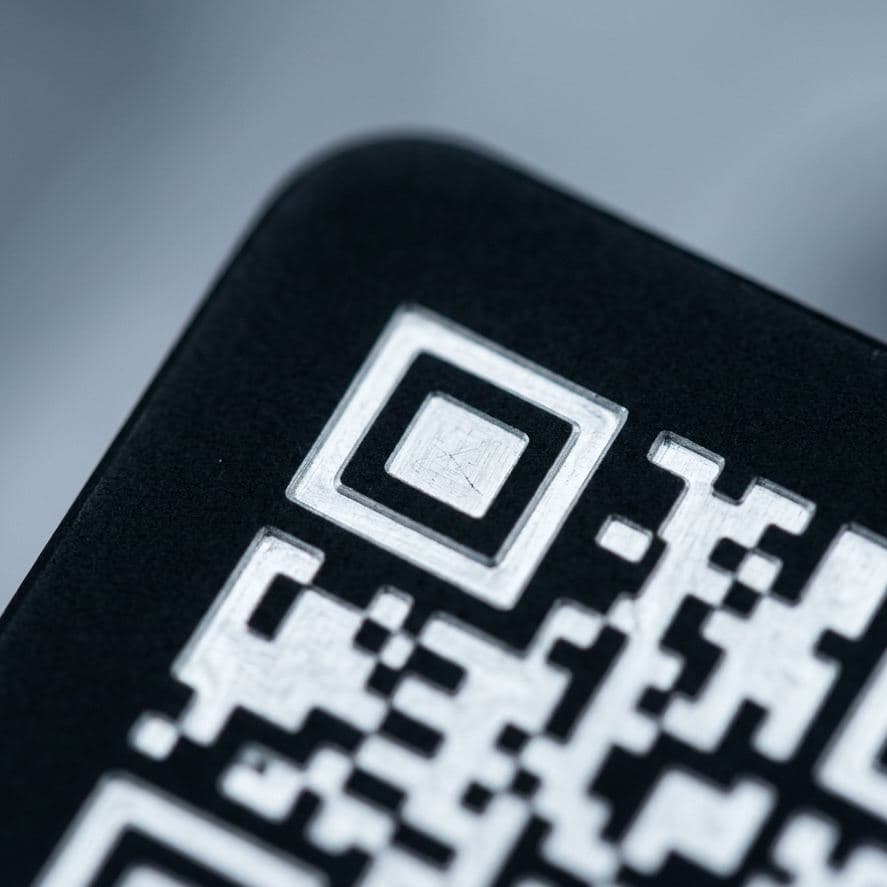
Laser marking anodized aluminum gives the highest-contrast direct part mark we produce: the laser removes the dye from the anodic layer and leaves a bright white mark on a black or colored background. Bare 6061 and 7075 are a different problem, with a frosted etch and lower contrast. This page covers both, and how to sequence the mark around Type II and Type III hardcoat anodize.
- Primary process
- Ablate (anodized) · Etch (bare)
- Contrast
- High anodized · Low–Medium bare
- Data Matrix readability
- Excellent anodized · Good bare
- Surface removal
- Dye layer (Type II) · Shallow etch (bare)
- Best background
- Black or dark dyed anodize
- Mark sequence
- After anodize, dye, and seal
Laser etching anodized aluminum: white on black.
An anodized part carries a porous aluminum oxide layer that has been dyed and sealed. At 1064 nm the fiber laser bleaches and removes the dye in that layer, and the marked area turns bright white to silver against the surrounding color. The shop-floor name is laser etching anodized aluminum. Strictly it is ablation of the dye: on Type II anodize the anodic layer itself stays largely in place, so corrosion protection is largely preserved.
Edges are sharp because the dyed layer is thin and uniform. Small text, fine logos, graduated scales, and dense Data Matrix codes all hold up, which is why black anodize is the usual specification for nameplates, panels, and housings that carry a lot of information. When a drawing calls for the mark to go through to bare metal, more energy removes the anodic layer entirely. State that requirement explicitly, because it is not the default.
Type II, Type III hardcoat, and clear.
Dyed Type II anodize (MIL-PRF-8625, formerly MIL-A-8625, Type II, Class 2) is the best-case substrate. Black gives the most contrast; dark blue, red, and green also mark well. Light dyes such as gold narrow the difference between mark and background, so confirm with a sample when a Data Matrix must be graded.
Type III hardcoat is thicker and harder. Black-dyed hardcoat marks with high contrast, though the mark may show a slight step. Undyed hardcoat is naturally gray to bronze depending on the alloy, and the mark on it is lower in contrast. Clear anodize marks poorly on any alloy: there is no dye to remove, so the result is a pale mark on a pale background. If a part will be marked, specify a colored anodize at the design stage.
Mark after anodize, dye, and seal. A light etch made before anodizing is largely lost in the anodize line’s own pre-treatment and under the coating. The exception is deep engraving, which survives anodize as a recessed feature and suits parts that will be stripped and re-anodized in service.
Bare aluminum: 6061, 7075, and castings.
Aluminum does not grow a dark oxide under the laser the way stainless steel and titanium do, so bare aluminum is not annealed. The standard mark is a light gray to white frosted etch a few microns deep. It is permanent and crisp, but contrast against a bright machined surface is low to medium. Tuned MOPA pulse parameters can produce a darker gray mark. How dark depends on the alloy and the surface finish, and it stays lower in contrast than a mark on steel.
Data Matrix readability on bare aluminum is good when the finish is uniform. Bead-blasted and fine-machined surfaces grade more consistently than surfaces with heavy tool marks, where the lay of the cut competes with the code. When a bare part needs a reliably dark mark, the options are deep engraving with paint or epoxy fill, anodizing the part, or a laser-marked label: see asset tags and UID labels.
Chem-film (chromate conversion) parts can be marked; the laser removes the thin conversion coating inside the mark. If the drawing requires unbroken coverage, raise it on the RFQ so the mark can be sequenced ahead of conversion coating. Codes on either surface are read back 100% and graded per ISO/IEC 15415, or AIM DPM-1-2006 for direct part marks. Quality describes the verification step, and the material marking guide compares aluminum with ten other substrates.
Alloy and stock notes.
Wrought alloys behave alike under the laser. The anodize, not the alloy, sets the contrast, except on undyed hardcoat and on castings. Equipment and mark types are listed under capabilities.
- 6061-T6
- The most common alloy we see. Etches to a uniform frosted white and anodizes and dyes evenly, so black-anodized 6061 is the reference case.
- 7075-T6
- Bare etch is comparable to 6061. Undyed hardcoat color varies with alloy content, which affects contrast on undyed parts only.
- 2024 / 5052
- Both etch and anodize-mark well. 5052 sheet is common for anodized panels and enclosures.
- Cast A356 / 380
- Porosity shows inside the mark, and high-silicon die-cast alloys anodize unevenly to begin with. Expect grade variation on as-cast surfaces; a machined pad helps.
- Anodized tag stock
- Pre-anodized black aluminum tag and nameplate stock for riveted or bonded plates. High contrast and Data Matrix-ready.
Typical applications
- Nameplates and data plates
- Control and front panels
- Electronic and optical housings
- Machined enclosures
- Fixtures and tooling plates
- Heat sinks
- Brackets
Calling out the mark on a drawing.
On anodized parts a marking note needs two facts: the sequence relative to anodize, and whether the anodic coating may be penetrated. On bare parts, state etch or engrave, and give a depth for engraving. Typical notes:
- NOTE 01LASER MARK AFTER ANODIZE. REMOVE DYE ONLY. DO NOT PENETRATE ANODIC COATING.
- NOTE 02ANODIZE PER MIL-PRF-8625 TYPE II CLASS 2, BLACK. LASER MARK PER ARTWORK, CHARACTER HEIGHT .XX.
- NOTE 03LASER ENGRAVE .XXX DEEP PRIOR TO ANODIZE.
Example wording only; your drawing standard and the governing specification control. For IUID data plates, content follows MIL-STD-130; size the symbol with the mark size calculator and mock it up with the Data Matrix generator. Terms are defined in the glossary. Unsure which note fits? Send the drawing.
Aluminum marking questions.
Does laser marking anodized aluminum remove the anodize?
By default, no. The laser removes the dye from the anodic layer and leaves the layer itself largely in place, so corrosion resistance is largely preserved on Type II anodize. Type III hardcoat may show a slight step at the mark. If the drawing requires the mark to go through to bare aluminum, that can be done with more energy, but it has to be specified.
Which anodize color gives the best laser mark?
Black. Black or dark dyed anodize gives the highest-contrast Data Matrix of any common substrate, with a bright white to silver mark. Dark blue, red, and green also mark well. Light dyes reduce contrast, and clear anodize marks poorly because there is no dye to remove. Specify a colored anodize when laser marking is planned.
Can you laser mark Type III hardcoat anodize?
Yes. Black-dyed hardcoat marks with high contrast, and the mark may show a slight step because the coating is thicker than Type II. Undyed hardcoat is naturally gray to bronze and gives a lower-contrast mark, so send a sample if a Data Matrix on undyed hardcoat has to meet a verification grade.
Can you put a black mark on bare aluminum?
Partially. A MOPA fiber laser with tuned parameters can produce a dark gray mark on bare aluminum, but contrast is lower than on steel and varies with alloy and surface finish. For a consistently dark mark, anodize the part first and mark the anodize, or deep engrave and fill with paint or epoxy.
Should aluminum parts be marked before or after anodizing?
After, in almost every case. Marking after anodize, dye, and seal produces the white-on-color mark. A light etch made before anodizing is largely lost under the coating. The exception is deep engraving before anodize, which leaves a recessed mark that survives the coating and any later strip and re-anodize.
Send the drawing and the anodize callout.
Quotes within one business day. Same-week turnaround on standard jobs, marked after your anodizer and read back 100%.